What you actually get
What is Grand Theft India AI?
Grand Theft India AI recreates the viral fake GTA 6 launch-eve prank from November 18, 2026: a friend counts down to what looks like GTA 6 on a wall-mounted TV in a purple-lit living room, the gamer dances holding the controller, and the screen boots straight into a parody "grand theft INDIA" title card instead.
Instead of sacrificing a real flat-screen TV or editing green-screen footage by hand, this template recasts the original living-room prank with one uploaded photo — keeping your face, hair, and home clothes from the opening dance all the way to the cracked screen and bare wall mount, with the original prank audio muxed onto the finished MP4.
How did Grand Theft India become a trend?
Posted the day before GTA 6 launched, the "Bro thought I bought him GTA 6" prank hit every gamer feed overnight and turned a fake title screen into one of November 2026's biggest viral skits.
The audio on the clip
The video model renders silently so motion, controller physics and identity stay sharp, then MakeTrend muxes the original living-room prank audio track straight back onto the finished MP4 — synced to the countdown, the reveal pause and the TV crash.
A short timeline
- Nov 18, 2026The original purple-lit living-room Instagram reel (@torrelltafa) launches the day before GTA 6 comes out and passes 4 million likes with the caption "Bro thought I bought him GTA 6".
- Nov 18, 2026A TikTok edit of the same living-room prank crosses 4.9 million views the same day, alongside countdown variations like @tayoricci's TV-punch take.
- Nov 19, 2026A real-life recreation of the fake GTA 6 reveal passes 1.8 million views as launch-day prank reactions flood Reels and Shorts.
- Nov 21, 2026TikTok fills with templates and AI photo-to-video remakes letting anyone drop themselves, a gamer friend or a pet straight into the original controller-throw prank.
The purple-lit living room, wall TV, countdown timing and caption bar stay true to the original reel; only the gamer holding the controller is recast from your photo.
Who people put in the Grand Theft India prank
Full-body or three-quarter photos in casual home clothes — T-shirts, hoodies, sweatpants or shorts — blend most naturally into the purple-lit living room, because the handheld camera films the gamer from across the room.
Gamer friends who spent years waiting for GTA 6 are the obvious favorite (as long as they're in on the joke), and pets are a close second: a dog or cat stands upright on its hind legs holding the controller in its front paws before launching it into the TV.
One clear face facing the camera gives the sharpest deadpan turn right before the controller throw.
- The friend who took launch day off work for GTA 6
- Your own full-body photo for a harmless living-room prank post
- Your cat or dog standing upright with a controller in its paws
- A deadpan portrait that nails the slow turn toward the lens
- A roommate or sibling in casual couch clothes
- A launch-week gaming group-chat gag without breaking a real TV
Want another viral skit or prank template? Try Closing Door Prank AI or Waiting On My Fries AI, or browse every comedy clip on the Skits & pranks AI videos shelf.
One photo, three steps: making your Grand Theft India AI video
Upload one photo and pick a resolution in the panel above — the purple-lit living room, Grand Theft India title reveal, controller throw and prank audio are handled automatically.
Add one photo
One clear photo of who gets pranked — head to toe works best for the across-the-room shot.
1 photoPick a finish
480p, 720p or 1080p — identical fake GTA 6 prank, controller throw and synced audio.
480p · 720p · 1080p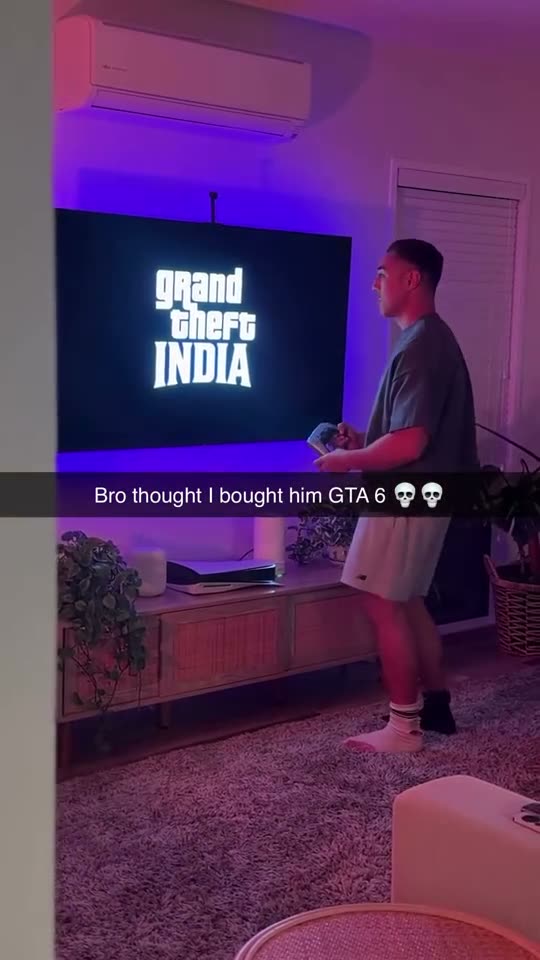
Render and download
Checkout starts the render; the 0:17 9:16 MP4 lands with sound and no watermark.
0:17 · 9:16 · MP4Full step-by-step notes
- Add one photo. Upload one clear photo of who gets pranked — head to toe if you can (JPG, PNG or WebP, up to 10 MB) — facing the camera in even light.
- Pick a finish. Choose 480p ($7.99), 720p ($16.99) or 1080p ($41.99). Every tier renders the exact same living-room prank, controller throw and falling TV with synced sound.
- Render and download. Checkout queues the render right away. In a few minutes, your 9:16 MP4 lands ready to download with the original prank audio muxed on and no watermark.
Rights. The preview clips above demonstrate the viral prank format. Your video is rendered fresh from the photo you upload with no watermark. MakeTrend is an independent tool and is not affiliated with Rockstar Games, Grand Theft Auto, or the creators of the viral reels. Only upload photos of yourself, your pet, or people who agreed to appear.
Grand Theft India AI FAQ
It is a viral fake GTA 6 living-room prank from November 18, 2026: a friend counts down while the gamer dances at the wall TV with a controller, the screen shows a parody "Grand Theft India" title instead of GTA 6, and the gamer stares deadpan before hurling the controller into the TV until it drops off the wall.
One sharp, front-facing, head-to-toe or three-quarter photo of a single person or pet in casual home clothes and even light, with no sunglasses, hat over the face, or second person in frame.
MakeTrend routes this template to our flagship video-recast pipeline with an automatic fallback model so real human and pet photos render cleanly shot for shot. You never have to pick a model or write a prompt — upload one photo and render.
Yes. A cat or dog keeps its own species, fur and markings, stands upright on its hind legs in front of the wall TV holding the controller in its front paws, and lands the same deadpan stare and TV-smash ending.
Yes. Your video plays in the original prank's purple-lit living room with the wall-mounted TV, handheld camera timing, "Grand Theft India" reveal screen and "Bro thought I bought him GTA 6" caption bar, while keeping your face and clothes from the photo.
Seventeen seconds (or 15 seconds on the automatic fallback master) in vertical 9:16 at 480p, 720p or 1080p, covering the entire prank from the countdown dance to the TV falling off the wall mount.
No, it is paid per clip with no subscription required. 480p is $7.99, 720p is $16.99 and 1080p is $41.99 — or 80, 170 and 420 credits. Nothing is charged until you start a render, and failed renders refund automatically.
No. The render runs silent so motion and identity stay crisp, and MakeTrend automatically muxes the original living-room prank audio track back onto your finished MP4 — ready to post straight to TikTok, Reels or Shorts.
You can put yourself, your pet, or a friend who agreed to be in on the joke. Group photos with two people will not work cleanly, and public figures or photos without consent are not permitted.
Your finished MP4 and download link stay available for 30 days, and the photo you uploaded is deleted automatically after 7 days. Save the file to your device once it finishes.
Ready to pull the fake GTA 6 prank?
Upload one clear photo of who gets pranked, pick a finish, and download your 9:16 MP4 with the original living-room sound and no watermark.